

TL;DR:
- Optimizing your Google Business Profile increases local visibility and turns it into a powerful marketing channel.
- Consistent management, including accurate information, engaging photos, and timely review responses, is essential for sustained success.
Your Google Business Profile is one of the most powerful free tools available for local visibility, yet most New Jersey small businesses barely scratch the surface of what it can do. Knowing how to optimize your Google Business Profile is the difference between showing up when a local customer searches and watching a competitor scoop that lead instead. This guide gives you a clear, step-by-step path through preparation, execution, and ongoing management so your profile works harder for your business every single day.
Key Takeaways
| Point | Details |
|---|---|
| Claim and verify | Secure control of your Google Business Profile by claiming and verifying ownership before optimizing. |
| Accurate core info | Use your exact real-world business name and keep your address, phone, hours, and categories precise and current. |
| Engage with reviews and images | Upload quality photos and manage customer reviews with professional replies to boost local trust. |
| Monitor and update regularly | Google may auto-update info; continuously monitor and use insights to refine your profile. |
| Optimization is ongoing | Treat your Google Business Profile as a dynamic marketing asset needing regular attention for best results. |
Preparing your Google Business Profile for optimization
Before you touch a single field in your profile, you need to confirm you actually control it. This sounds obvious, but it is one of the most common mistakes we see NJ business owners make. They spend hours crafting descriptions and uploading photos on a profile they do not own, and none of it sticks.
The first step is to claim or create your profile. Adding or claiming your Business Profile is free through Google, but you must complete verification before you can manage it. Verification is not optional. Until Google confirms you are the rightful owner, your edits may never go live.
Here is what to check before you start optimizing your Google Business Profile:
- Is your profile already claimed? Search your business name on Google Maps to find out.
- If someone else claimed it, use Google’s ownership request process to transfer control.
- Are you signed in to the right Google Account? You must be signed in to the Google Account that manages the verified profile to edit core business information.
- Do you have one profile per physical location? Multiple overlapping profiles create data conflicts and confuse Google’s ranking signals.
- Have you received and acted on your verification code? Postcards, phone calls, and video verification are all options depending on your business type.
Pro Tip: If your business was previously managed by a marketing agency or a former employee, check who owns the profile before spending any time on optimization. Unverified profiles cannot be fully edited, and unclaimed profiles leave your data vulnerable to inaccurate public edits.
| Verification method | Best for | Timeline |
|---|---|---|
| Postcard | Most businesses with a physical address | 5 to 14 days |
| Phone or text | Eligible businesses with a verified number | Immediate |
| Video | New or hard-to-verify locations | 3 to 7 days |
| Select account types | Immediate |
With your Google Business Profile claimed and verified, you are ready to start optimizing the key elements that influence local ranking and customer engagement.
Optimizing core business information for accuracy and compliance
Getting your basic information right is not busywork. Google uses it to decide whether your business is relevant, trustworthy, and worth surfacing in local results. One small error, like a keyword stuffed into your business name, can trigger a suspension that takes weeks to resolve.
Your business name must match reality. Google’s guidelines are clear: your Business Profile name must reflect your real-world business name and exclude unnecessary information to avoid suspension. “Garden State Plumbing” is correct. “Garden State Plumbing Best Plumbers NJ Emergency Service” is a policy violation waiting to happen.
Here are the core fields that directly influence your local ranking and lead generation:
- Business name: Use your official name exactly as it appears on your signage, stationery, and legal documents.
- Address: Provide a precise physical address. If you go to your customers instead, set a service area rather than listing a home address publicly.
- Phone number: Use a local number tied directly to your location. National call center numbers dilute the local trust signals Google looks for.
- Hours: Accurate hours matter more than most business owners realize. Wrong hours cost you customers and damage your credibility. Update them for holidays, special events, and seasonal changes.
- Categories: Your primary category carries the most ranking weight. Choose the one that most precisely describes your core business activity. You can add up to nine secondary categories, but each should reflect an actual service you provide, not a keyword you want to rank for.
The address, phone, hours, and attributes on your profile must be accurate, current, and verified before they take effect. For New Jersey businesses with multiple locations, such as a law firm with offices in Newark and Hoboken, each location needs its own profile with its own accurate, location-specific information.
Pro Tip: Your primary category is the single highest-leverage decision in your profile. Spend real time on it. If you run an Italian restaurant, “Italian Restaurant” will outperform “Restaurant” every time because it matches more specific local searches.

Once your core business information is correct and compliant, you can boost appeal and engagement through images and customer interactions, which is where the real magic happens for boosting local online visibility.
Leveraging images and customer reviews to enhance engagement
A profile with accurate information but zero photos looks abandoned. A profile with dozens of genuine customer reviews and fresh images looks alive. Google rewards activity. So do customers.
Follow these steps to build a visually compelling, trust-worthy profile:
- Upload a high-quality cover photo that represents your brand at first glance.
- Add interior and exterior photos so customers know what to expect when they arrive.
- Include photos of your team, your products, and your most popular services.
- Refresh your photo library at least once a month to signal ongoing activity.
- Use a business logo that matches your other branding materials exactly.
For reviews, the playbook is straightforward but requires consistency:
- Generate a direct review link from your profile dashboard and share it via email, text, or a printed QR code at your location.
- Respond to every review, positive or negative, within 48 hours when possible.
- Keep responses professional, specific, and never defensive.
- Flag reviews that contain hate speech, spam, or off-topic content for Google to evaluate.
One thing that surprises many business owners: review reply approvals can take up to 30 days before appearing publicly, and your personal name is never shown. Plan for that delay, especially when responding to a negative review you want customers to see addressed quickly.
According to the U.S. Chamber of Commerce, categories, photos, and review requests are among the top levers for local visibility. These are not optional extras. They are core to how Google evaluates your profile’s authority and relevance in local SEO strategies.
Pro Tip: Never offer incentives in exchange for reviews. Google prohibits it, and customers can tell when reviews feel transactional. A simple, honest ask at the right moment, like right after completing a job or delivering a great meal, produces far more authentic results.
With engaging images and active review management underway, your next focus should be on refining your profile through ongoing updates and insights monitoring.
Maintaining and monitoring your profile with updates and insights
Here is something most guides skip entirely: Google can and does change your profile without asking you. It pulls data from user reports, third-party directories, and licensed data sources. If that data conflicts with what you have entered, Google may override your information with something inaccurate.
Google may update your profile based on user reports and licensed content. You can review and manage certain updates, but not all of them. That means you need to check your profile regularly, not just when you feel like it.
Here is a simple monthly monitoring routine that keeps your profile sharp:
- Log in and scan for blue-highlighted suggestions from Google. Approve accurate ones. Correct inaccurate ones immediately.
- Review your Google Insights dashboard for profile views, search queries, and customer actions like calls and direction requests.
- Check that your hours, address, and phone number are still displaying correctly.
- Look at the photos section to confirm no inappropriate user-submitted photos have appeared.
- Update any seasonal hours, new service areas, or attribute changes.
| Insight metric | What it tells you | Action to take |
|---|---|---|
| Search queries | What terms customers use to find you | Adjust description and categories to match |
| Profile views | How often your profile appears | Compare with competitors and identify gaps |
| Direction requests | Intent to visit your location | Confirm address and hours are accurate |
| Photo views | Which images attract the most attention | Upload more of that content type |
| Call clicks | Direct call conversions from your profile | Test different phone numbers or hours |
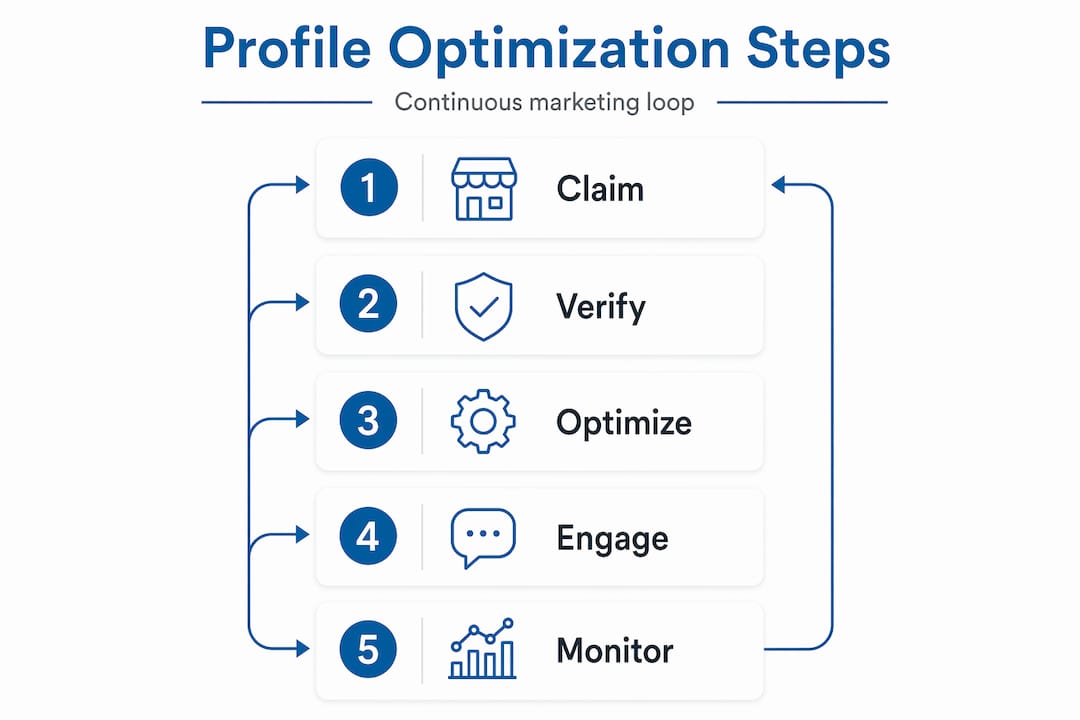
As the U.S. Chamber of Commerce notes, Google optimization is an ongoing marketing loop. Publishing updates, requesting reviews, and using insights to refine your approach is what separates thriving local profiles from stagnant ones. Treat your local digital marketing presence the same way you treat your storefront. If you stop maintaining it, it shows.
Pro Tip: Set a recurring calendar reminder every 30 days titled “GBP audit.” Make it non-negotiable. Businesses that check in monthly catch Google’s automatic overrides before they do lasting damage.
Why optimizing your Google Business Profile is an ongoing marketing strategy, not a set-and-forget task
We have worked with enough New Jersey small businesses to know the pattern well. A business owner spends a Saturday afternoon filling out their profile, uploads a few photos, and considers the job done. Six months later, their hours are wrong because Google accepted a user suggestion, their primary category has drifted, and a string of unanswered negative reviews sits front and center. They cannot figure out why leads dried up.
The uncomfortable truth is that Google optimization is an ongoing loop. Publishing updates, requesting reviews, and using insights to adjust your strategy is how the best-performing local profiles stay at the top. It is not a one-time event.
Google pulls profile data from multiple sources, including user-submitted changes, third-party data providers, and licensed content databases. That means your carefully crafted information is always one bad data point away from being overwritten. Without consistent monitoring, you would never know it happened.
Here is the mindset shift that actually moves the needle: stop thinking of your Google Business Profile as a listing and start treating it as a living, breathing marketing channel. The businesses we see winning in competitive New Jersey markets, from Bergen County contractors to Monmouth County restaurants, are the ones publishing fresh photos weekly, responding to reviews within a day, and checking their insights every month to understand what is working.
Honest business names, timely review responses, and accurate information are not just policy compliance. They are the building blocks of customer trust. And in a market where your next-door competitor is one Google search away, trust is the competitive advantage that compounds over time. We recommend mastering local SEO tips alongside your profile management to build a foundation that sustains growth well beyond a single search result.
How Big Fin SEO supports your Google Business Profile optimization in New Jersey
Charting a course through Google Business Profile optimization takes time, attention, and expertise that most business owners simply do not have to spare. That is where we come in. At Big Fin SEO, we work specifically with New Jersey businesses to claim, verify, and fully manage their profiles, so no detail slips through the cracks.
Our team pairs local SEO strategies with hands-on profile management to drive real results: more visibility, more calls, more leads. We do not just set up your profile and disappear. We monitor it, respond to Google’s automatic changes, and use insights data to keep your listing ahead of local competitors. Whether you are starting from scratch or want to sharpen an existing profile, our SEO services for beginners and website optimization techniques give you a full-stack approach to local visibility. Ready to stop guessing and start growing? Reach out to Big Fin SEO today and let’s build something worth ranking.
Frequently asked questions
How do I claim or verify my Google Business Profile?
You can claim or add your profile for free at business.google.com/add and complete the verification steps Google provides. Claiming your Business Profile is free and gives you full editing rights once verification is confirmed.
Can I change my business name on Google to add keywords or locations?
No. Google’s guidelines require your Business Profile name to match your real-world business name exactly, without extra keywords or location terms, to avoid profile suspension.
How long does it take for Google to approve replies to customer reviews?
Review replies are typically reviewed within 10 minutes but can take up to 30 days before appearing publicly, and your personal name is never displayed alongside them.
Why does Google sometimes change my Business Profile information automatically?
Google updates profiles using data from user reports, third-party sources, and licensed content when it detects information that appears outdated or incorrect, which is why regular audits are essential.
How often should I update my Google Business Profile?
Monthly updates are the minimum, covering photos, hours, and review responses. Ongoing optimization as a continuous marketing loop, not a one-time task, is what keeps your profile competitive in local search.

Michael Fleischner is the founder of Big Fin SEO, a New Jersey-based local SEO agency helping service-area and multi-location businesses increase visibility, generate qualified leads, and drive measurable revenue from search.
He is a TEDx speaker, Amazon-published author of The 7 Figure Freelancer, and a frequent speaker on SEO, AI-driven marketing, and personal branding.



 Corine R.
 Laura A.