

TL;DR:
- Regular website updates enhance credibility, improve search rankings, and prevent costly security breaches.
- Consistent content refreshes and technical maintenance keep sites relevant, trustworthy, and optimized for AI-driven search.
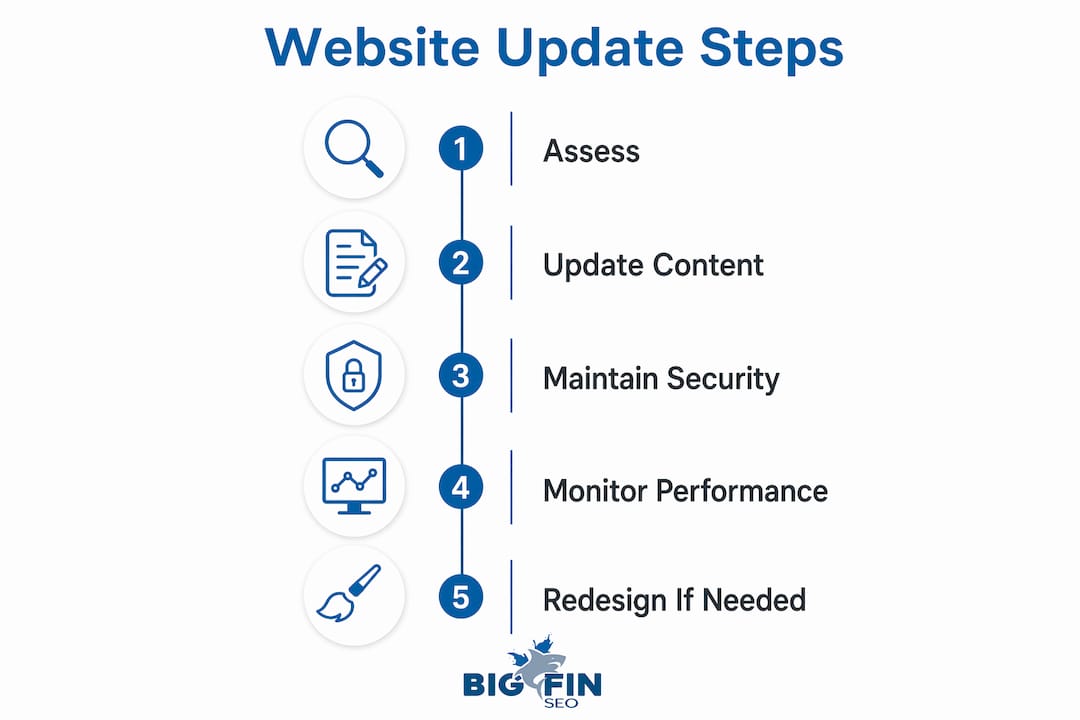
Updating your website is the single most direct action you can take to protect your business credibility, hold your search rankings, and keep customers from walking straight to a competitor. 75% of users judge a business’s credibility based solely on its website design. That means your site is making a first impression before a single word is read. Regular website maintenance, which professionals also call site hygiene or continuous improvement, covers everything from fresh content and security patches to full structural overhauls. Get it right, and your site becomes your strongest sales asset. Ignore it, and you’re handing ground to every competitor who didn’t.
Why update your website for business credibility and customer trust?
An outdated website signals one thing to visitors: this business is not paying attention. Users who land on a site with stale content, broken images, or a design that looks five years old assume the company is inactive or unreliable. That perception costs real revenue.

The credibility problem runs deeper than aesthetics. When visitors sense neglect, they question whether your prices, hours, or contact information are accurate. Doubt kills conversions faster than any technical error. Your competitors with current, well-maintained sites collect those customers instead.
Signs that your site is eroding trust include:
- Outdated blog posts or news sections with dates more than a year old
- Broken links that lead to 404 error pages
- Old team photos or bios for staff who no longer work there
- Product or service pages that no longer reflect your current offerings
- Slow load times caused by unoptimized images or legacy code
Each of these signals tells a visitor the same story: nobody is minding the ship. Fixing them is not a design project. It is a trust project.
Pro Tip: Survey your customers quarterly with a single question: “Did our website give you the information you needed?” Low scores are your clearest signal that a content refresh is overdue.
What is the role of regular content updates in SEO and AI visibility?
Content freshness is now a ranking factor in both traditional search engines and AI-driven platforms like ChatGPT, Perplexity, and Google’s AI Overviews. Key content pages updated every 30–60 days improve AI-driven search visibility, while pages left static for more than 90 days lose AI relevance. That window is tighter than most business owners realize.
Understanding the difference between “updating” and “refreshing” content matters here. Updating means fixing functional issues: correcting a broken link, swapping an outdated statistic, or adding a new product. Refreshing means a strategic rewrite that deepens coverage, fills gaps in the user journey, and repositions the page for current search intent. Both are necessary, but they serve different purposes.
The sequence that works best for most business sites looks like this:
- Audit your top 10 traffic pages every month using Google Analytics or Google Search Console.
- Identify pages where traffic or click-through rate has dropped over the past 60 days.
- Update factual claims and statistics on those pages first. Outdated numbers are the fastest path to losing AI citations.
- Expand thin sections where competitors now offer more depth than you do.
- Refresh the meta title and description to match current search intent and include natural language questions.
“Updating content for relevancy, depth, and to fill user journey gaps is more valuable than updating for frequency alone. Google rewards relevance and usefulness over pure activity.”
Content decay happens when competitors release fresher, more detailed information on the same topic. Your page does not get worse in isolation. It gets worse relative to what else is available. Strategic refreshing is the counter-move. Pair this with a solid understanding of AI’s impact on SEO to stay ahead of how generative models select and cite sources.
Pro Tip: Use the partner resource on updating content for SEO to benchmark how often your content type should be refreshed for maximum AI visibility.
Why is weekly technical website maintenance vital for security and performance?
Security is the least glamorous reason to update your website, and the most expensive one to ignore. Failing to update technical dependencies weekly is the leading cause of security breaches for small and mid-sized business sites. Plugins, themes, and content management systems like WordPress release patches constantly. Each unpatched version is an open door.
The financial math is straightforward. Monthly maintenance plans typically run $100–$300. A security breach costs $500–$3,000 or more to remediate, and that figure does not include lost revenue, damaged reputation, or the time your site spends offline. Prevention is not just safer. It is significantly cheaper.
Key technical maintenance tasks to run on a weekly or monthly basis include:
- Plugin and theme updates to close known security vulnerabilities
- SSL certificate checks to confirm your site is serving secure HTTPS connections
- Broken link scans using tools like Screaming Frog or Ahrefs
- Core software updates for your CMS platform
- Backup verification to confirm your most recent backup is complete and restorable
- Page speed audits using Google PageSpeed Insights to catch performance regressions
Pro Tip: Automate your security scans with a managed hosting plan or a dedicated maintenance service. Manual checks get skipped. Automated checks do not.
Technical debt compounds quietly. A plugin ignored for six months does not just create one vulnerability. It creates a chain of missed patches, each one building on the last. Treat your site’s technical stack the way a ship’s crew treats the hull: inspect it regularly, fix small issues before they become structural failures.
When should you consider a full website redesign instead of updates?
A redesign is not a bigger update. It is a foundational rebuild, often involving a new design system, new components, and a CMS migration. Full website redesigns are typically recommended every 2–3 years, but the trigger should be performance signals, not a calendar date.
Redesign timing is best driven by real performance data: a sustained drop in conversions, a mobile experience that fails Core Web Vitals benchmarks, or a site architecture that prevents AI platforms from crawling and citing your content. If incremental updates can fix the problem, a redesign is premature. If the underlying structure is the problem, no amount of patching will solve it.
| Factor | Incremental update | Full redesign |
|---|---|---|
| Scope | Single pages or features | Entire site structure |
| Timeline | Days to weeks | 2–6 months |
| Cost | Low to moderate | High |
| Trigger | Stale content, minor bugs | Conversion collapse, outdated CMS |
| Frequency | Ongoing, weekly or monthly | Every 2–3 years |
| Risk | Minimal | Significant if mismanaged |
The clearest signal for a redesign is when your site’s architecture prevents you from competing. If your navigation confuses users, your mobile layout breaks on current devices, or your page structure makes it impossible for AI search engines to extract and cite your content, updates will not fix those problems. A redesign will.
How to use data-driven strategies to plan and prioritize your website updates?
Data monitoring of visitor behavior is the most reliable way to decide which pages need attention and in what order. Without data, you are guessing. With it, you are charting a course based on what your visitors actually do.
A practical monthly review routine covers these areas:
- Traffic trends by page: Which pages lost the most organic visitors compared to the prior month?
- Bounce rate by landing page: High bounce rates on key service pages signal a mismatch between what visitors expected and what they found.
- Conversion rate by page: If a page drives traffic but no leads, the content or call to action needs work.
- Average time on page: Very short session durations on long-form content suggest the page is not delivering on its promise.
- Search Console performance: Which queries are you ranking for on page two? Those pages are the highest-value refresh targets.
Continuous micro-updates such as fixing broken links, updating statistics, and correcting outdated facts signal active site maintenance to search engines. These small actions compound over time. A site that gets 10 small improvements per month outperforms a site that gets one large update per quarter, because search engines and AI platforms reward consistent signals of activity and relevance. Pair your analytics review with an SEO best practices checklist to make sure each update targets the right ranking factors.
Key Takeaways
Regular website updates protect credibility, improve search rankings, prevent costly security breaches, and keep your content competitive against fresher alternatives.
| Point | Details |
|---|---|
| Credibility depends on design | 75% of users judge business credibility by website design, making updates non-negotiable. |
| Content freshness drives AI visibility | Update key pages every 30–60 days to maintain relevance in AI-driven search results. |
| Security maintenance saves money | Monthly maintenance at $100–$300 prevents breaches that cost $500–$3,000 or more to fix. |
| Redesigns follow performance signals | Plan a full redesign every 2–3 years, triggered by conversion drops or structural failures. |
| Data guides update priorities | Use traffic, bounce rate, and Search Console data to identify which pages need refreshing first. |
The update routine most businesses get wrong
Most business owners treat their website like a storefront renovation: something you do every few years when it looks bad enough. That mental model is the source of most website problems I see. The site gets ignored for 18 months, something breaks or rankings drop, and then there is a scramble to fix everything at once. That scramble is expensive, stressful, and largely avoidable.
The businesses that consistently outrank their competitors are not doing dramatic overhauls. They are doing small, consistent work. A content refresh here, a plugin update there, a page restructured because the data showed it was underperforming. That rhythm compounds. After 12 months of consistent maintenance, the site is fundamentally stronger than one that received two big updates in the same period.
The misconception I push back on hardest is that a redesign solves a content problem. It does not. If your pages are thin, outdated, or poorly structured for AI retrieval, a new design will not fix that. Content quality and technical health are the foundation. Design sits on top. Build the foundation first, then worry about how it looks.
My recommendation for any business owner or marketer reading this: set a monthly calendar reminder for a 30-minute site review. Check your top pages in Search Console, run a broken link scan, and update one piece of content that the data says is underperforming. That 30 minutes per month will do more for your rankings than any single redesign project.
— Michael Fleischner
How Bigfinseo helps you stay ahead with ongoing site optimization
Your website is not a one-time project. It is a living asset that needs consistent attention to keep delivering results. Bigfinseo works with agencies and marketers who want expert-level SEO and AI optimization without building an in-house team from scratch.
Bigfinseo’s white-label SEO services are built for agencies that need proven results delivered under their own brand, fast. From content refreshing and technical audits to full AI search optimization, the team handles the work while you focus on growing your client base. Services go live in as few as five business days. If your clients need stronger search visibility and fresher content, Bigfinseo has the crew to make it happen.
FAQ
Why does updating your website matter for SEO?
Search engines and AI platforms reward content freshness and technical health. Pages updated every 30–60 days maintain stronger rankings and AI citation rates than static pages.
How often should you update website content?
Key service and landing pages benefit from updates every 30–60 days. Blog posts and supporting content should be reviewed quarterly and refreshed when traffic or rankings decline.
What is the difference between a website update and a redesign?
An update addresses specific content, security, or performance issues on existing pages. A redesign rebuilds the site’s structure, design system, and often its CMS, typically every 2–3 years.
What are the biggest risks of not updating your website?
Neglecting updates leads to security breaches costing $500–$3,000 or more, declining search rankings, and lost customer trust from outdated content and broken functionality.
How do I know which pages to update first?
Use Google Analytics and Google Search Console to identify pages with dropping traffic, high bounce rates, or declining click-through rates. Those pages deliver the highest return when refreshed.

Michael Fleischner is the Founder and CEO of Big Fin SEO, a New Jersey-based digital marketing and SEO agency helping service-area and multi-location businesses increase visibility, generate qualified leads, and drive measurable revenue from search.
He is a TEDx speaker (“The Freelance Journey”), and the author of multiple marketing and SEO books, including SEO Made Simple and The 7 Figure Freelancer. He served as President of the American Marketing Association’s Professional Chapters Council (2022–2023), founded CapitalQuest AI, and has over 20 years of experience in marketing and search.



 Corine Rigby
 Laura Ayres
 Michael Fleischner